고정 헤더 영역
상세 컨텐츠
본문
반응형
Swagger
RESTful API 서비스를 개발하고 문서화하는 데 도움을 주는 오픈소스로 간단하게 설명하면 Swagger는 API Spec 문서이다. API를 엑셀이나 가이드 문서를 통해 관리하는 방법은 주기적인 업데이트가 필요하기 때문에 관리가 쉽지 않고 시간이 오래 걸린다.
그래서 Swagger를 사용해 API Spec 문서를 자동화해 주어 간편하게 API문서를 관리한다.
Swagger 특징
- 개발한 Rest API를 문서화한다.
- 문서화된 내용을 관리할 수 있다.
- 간단한 UI를 제공함으로써, API를 테스트할 수 있다.
Swagger 라이브러리
Springfox와 Springdoc의 특징을 확인하고 환경과 상황에 맞는 라이브러리를 사용하는 것을 추천한다.
Springdoc은 업데이트가 지속적으로 되고 있고 Springfox는 2020년 이후로 업데이트가 되지 않기에 Springdoc을 사용하기로 결정했다.
Springfox
특징
- Springfox는 초기에는 Swagger 2만 지원했으나, 최신 버전에서는 OpenAPI 3도 지원
- Spring Boot 애플리케이션과 쉽게 통합할 수 있으며, Spring MVC와도 호환
- Springfox는 이전 버전의 Spring과도 호환되므로, 기존 프로젝트에 쉽게 적용할 수 있다.
단점
- 활발한 업데이트 부족하다. 2020년 이후 새로운 버전이 나오고 있지 않다.

Springdoc
특징
- Springdoc은 OpenAPI 3 사양을 완벽하게 지원
- 대부분의 설정이 자동으로 이루어지며, 더 간단하고 직관적인 설정과 최신 기능을 제공
- Springfox보다 더 활발하게 유지보수되고 있다.
- 다양한 커스터마이징 옵션과 플러그인 지원이 있어, 필요에 따라 기능을 확장할 수 있다.

Swagger 설정
pom.xml
<!-- Swagger -->
<dependency>
    <groupId>org.springdoc</groupId>
    <artifactId>springdoc-openapi-ui</artifactId>
    <version>1.7.0</version>
</dependency>
1.7.0 버전이 가장 많이 사용되고 있기에 1.7.0 선택
application.yml
springdoc:
  api-docs:
    path: /api-docs                            # OpenAPI 문서의 기본 경로 설정 / defualt는 /v3/api-docs
  swagger-ui:
    #default path는 /swagger-ui/index.html
    operations-sorter: alpha                    # alpha(알파벳 오름차순), method(HTTP메소드순)
    tags-sorter: alpha                          # 태그 정렬 순서.   alpha: 알파벳 순 정렬,
    disable-swagger-default-url: true           # swagger-ui default url인 petstore html의 비활성화 설정
    display-request-duration: true              # 요청 소요 시간 표시
  default-consumes-media-type: application/json # request media type 의 기본 값
  default-produces-media-type: application/json # response media type 의 기본 값
  paths-to-match:                               # 해당 패턴에 매칭되는 Restcontroller만 swagger-ui에 노출한다.
  - /api/v1/**
  - /devlog/**

  permit:
  url:
    ...

    /swagger-ui/**,
    /api-docs/**
Spring Security에서 제외되어야 할 URL경로에도 포함시켜 준다.
swagger-ui.path 설정을 하지 않으면 http://localhost:{port}/swagger-ui/index.html로 접속하면된다.
SecurityConfiguration.java
@Configuration
@RequiredArgsConstructor
@EnableWebSecurity
public class SecurityConfiguration {

    @Value("${permit.url}")
    private final String[] PERMIT_ALL_RESOURCES;


    @Bean
    protected SecurityFilterChain configure(HttpSecurity httpSecurity) throws Exception {
        httpSecurity
              ...

            .authorizeHttpRequests(authorize -> authorize
                    .requestMatchers(this.getPermitAllResources()).permitAll()
                    .requestMatchers(new AntPathRequestMatcher("/admin/**")).hasAuthority("ADMIN")
                    .requestMatchers(new AntPathRequestMatcher("/api/v1/**")).hasAnyAuthority("USER", "ADMIN")
                    .anyRequest().authenticated())

              ...

        return httpSecurity.build();
    }

    private AntPathRequestMatcher[] getPermitAllResources() {
        AntPathRequestMatcher antPathRequestMatcherArr[] = new AntPathRequestMatcher[PERMIT_ALL_RESOURCES.length];
        for(int nIdx = 0 ; nIdx < PERMIT_ALL_RESOURCES.length ; nIdx++) {
            antPathRequestMatcherArr[nIdx] = new AntPathRequestMatcher(PERMIT_ALL_RESOURCES[nIdx]);
        }
        return antPathRequestMatcherArr;
    }
}
Swagger관련 URL은 Spring Security에서 접근허용설정
Spring Security 자세한 내용은 아래 포스팅을 참조하기 바람.
Spring Security + JWT 인증 (2/2) - Spring Security 설정
SwaggerConfiguration.java
import org.springframework.context.annotation.Bean;
import org.springframework.context.annotation.Configuration;

import com.devlog.common.jwt.JwtProvider;

import io.swagger.v3.oas.models.Components;
import io.swagger.v3.oas.models.OpenAPI;
import io.swagger.v3.oas.models.info.Info;
import io.swagger.v3.oas.models.security.SecurityRequirement;
import io.swagger.v3.oas.models.security.SecurityScheme;
import lombok.RequiredArgsConstructor;

@Configuration
@RequiredArgsConstructor
public class SwaggerConfiguration {

    private final JwtProvider jwtProvider;

    @Bean
    public OpenAPI openAPI() {
        String jwtSchemeName = jwtProvider.getJwtHeader();
        SecurityRequirement securityRequirement = new SecurityRequirement().addList(jwtSchemeName);
        SecurityScheme securityScheme = new SecurityScheme();
        securityScheme.name(jwtSchemeName);
        securityScheme.description("JWT 입력");
        securityScheme.type(SecurityScheme.Type.HTTP);
        securityScheme.scheme(jwtProvider.getJwtType());
        securityScheme.bearerFormat(jwtProvider.getJwtType());

        Components components = new Components().addSecuritySchemes(jwtSchemeName, securityScheme);

        return new OpenAPI()
                .addSecurityItem(securityRequirement)
                .components(components)
                .info(apiInfo());
    }

    private Info apiInfo() {
        return new Info()
                .title("DevLog Swagger")
                .description("DevLog Swagger Description ... ")
                .version("1.0.0");
    }
}
JWT 인증을 사용하고 있기 때문에 Swagger로 API를 테스트할 때 JWT 토큰이 필요하다.
위에 설정으로 Swagger에서 JWT 토큰값을 입력한 후 API 테스트를 할 수 있다.
Swagger UI

- defualt path는 /swagger-ui/index.html로 설정되어 있는 것 확인.
- Swagger Config파일에서 설정한 Title, Description, Version이 출력되는 것 확인.
- api-docs path가 /api-docs로 설정된 것 확인.

- paths-to-match에 설정하였던 /devlog/**, /api/v1/** 두 개의 URL 패턴의 경로만 Swagger-ui에 표현되는 것 확인.
- 우측상단에 JWT인증을 위해 Authorize 버튼이 활성화된 것 확인
JWT 토큰을 입력한 후 API테스트를 진행하면 JWT인증 절차가 통과된다.

Swagger 어노테이션
@Tag
- API 그룹 설정
- Controller나 Controller의 Method 영역에 설정한다
- name : Tag의 이름
- description : Tag에 대한 설명
@Slf4j
@RequestMapping("/devlog/quartz")
@RestController
@RequiredArgsConstructor
@Tag(name = "Quartz", description = "Quartz 테스트 - JWT 인증 필요없음")
public class QuartzTestController {
    ...
}
@Operation
- API 동작에 대한 명세를 작성하기 위해 Controller 메서드에 설정
- summary : API에 대한 간략 설명
- description : API에 대한 상세 설명
@Operation(summary = "Quartz Scheduler 등록", description = "Quartz Scheduler 등록 - JWT 인증 필요없음")
@GetMapping("/addJob")
public ResponseEntity<Void> addJob( ... ) {}
@Parameter
- @Parameters 어노테이션에 @Parameter 리스트를 담아 api메서드에 설정할 수 있다
- @Operation 어노테이션에 parameters 요소에 설정할 수도 있다.
@Parameters 나 @Operations에 파라미터를 설정할 경우에는 어떤 파라미터에 대한 설정인지 알 수 없기 때문에 반드시 name을 설정해 줘야 한다.
@Parameters({
    @Parameter(name = "jobName", description = "Quartz Schduler Job Name")
    ,@Parameter(name = "jobGroup", description = "Quartz Schduler Job Group")
    ,@Parameter(name = "jobDesc", description = "Quartz Schduler Job Description")
    ,@Parameter(name = "cronExpr", description = "Quartz Schduler Cron Expression - Ex) 0 * * * * ?")
})
@Operation(summary = "Quartz Scheduler 등록", description = "Quartz Scheduler 등록 - JWT 인증 필요없음")
@GetMapping("/addJob")
public ResponseEntity<Void> addJob(String jobName, String jobGroup, String jobDesc, String cronExpr) {
    ...
}
@Operation(summary = "Quartz Scheduler 삭제", description = "Quartz Scheduler 삭제 - JWT 인증 필요없음")
@GetMapping("/deleteJob")
public ResponseEntity<Void> deleteJob(
@Parameter(name = "jobName", description = "Job Name") @RequestParam(required = true) String jobName
,@Parameter(name = "jobGroup", description = "Job Group") @RequestParam(required = true) String jobGroup) {
...
}
변수에 직접 설정할 수 있고 메서드에 설정할 수 있다. 개인적으로 메서드에 설정하는 게 가독성 있다고 생각된다.

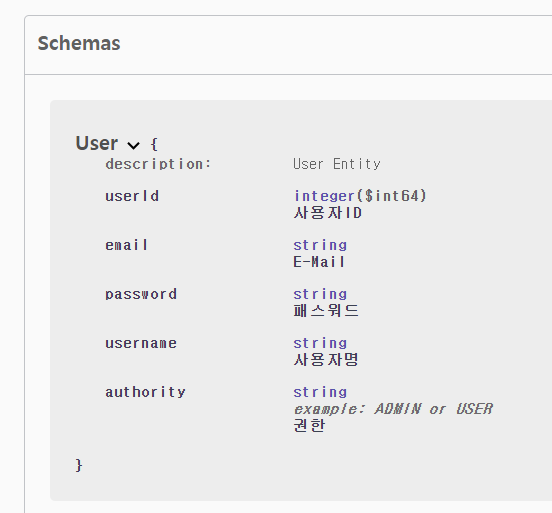
@Schema
- Model(객체)에 대한 정보를 작성
- Schema를 설정할 시, 더욱 완성도 높은 Swagger UI 문서를 만들 수 있다.
@Setter
@Getter
@Entity
@Schema(description = "User Entity")
@Table(name = "DEV_USER")
public class User {

    @Id
    @GeneratedValue(strategy = GenerationType.IDENTITY)
    @Schema(description = "사용자ID")
    private long userId;

    @Column(unique = true, nullable = false)
    @Schema(description = "E-Mail")
    private String email;

    @Column(nullable = false)
    @Schema(description = "패스워드")
    private String password;

    @Column(nullable = false)
    @Schema(description = "사용자명")
    private String username;

    @Column(nullable = false)
    @Schema(description = "권한", example = "ADMIN or USER")
    private String authority;
}
@ApiResponse
- 응답 결과에 따른 response 구조를 미리 확인할 수 있게 해 준다.
- 지정하지 않을 경우 상태코드 200과 비어있는 응답 바디로 표기된다.
- @ApiResponses를 활용하여 복수 개를 한 번에 작성할 수 있다.
- @Operation의 responses에 작성할 수도 있다.
@ApiResponses({
    @ApiResponse(responseCode = "200", description = "성공"),
    @ApiResponse(responseCode = "400", description = "실패")
})
반응형
>


댓글 영역